¶  | Personal Panel Guide
¶ 🌐 Available Guides
- 📌 How to Create a Server
- 📁 How to upload large files/folders
- 👤 Creating Subusers
- 🛢️ How to Create Databases
¶ 📌 How to Create a Server
Follow this guide to set up your game server with ease.
¶ 1️⃣ Create Port Allocation
Before creating any servers, ensure you have at least one open port allocated to assign to your new server.
- Log in to your panel and navigate to the Administration area.
- Go to
Dedicated Nodes→NODE-SIZE-ID→Allocation (Port Forwarding). - On the Add Allocation page (see the screenshot below), enter your local IP address and public IP address in the fields marked by the red boxes.
- In the yellow box, specify the desired port you want to open (e.g.,
25565for a Minecraft server). This port will be assigned to the server you plan to create.
Common Default Server Ports
- ARK: Survival Evolved:
27015or7777 - CS2:
27015 - DayZ:
2302 - Factorio:
34197 - FiveM (GTA V):
30120+ (40120for txAdmin) - Garry's Mod:
27015 - Minecraft:
25565 - Project Zomboid:
16261 - Rust:
28015or28016 - Team Fortress 2:
27015 - The Forest:
27015or8766 - Unturned:
27015or27016 - Valheim:
2456 - V Rising:
9876
If not listed above simply do a Google search
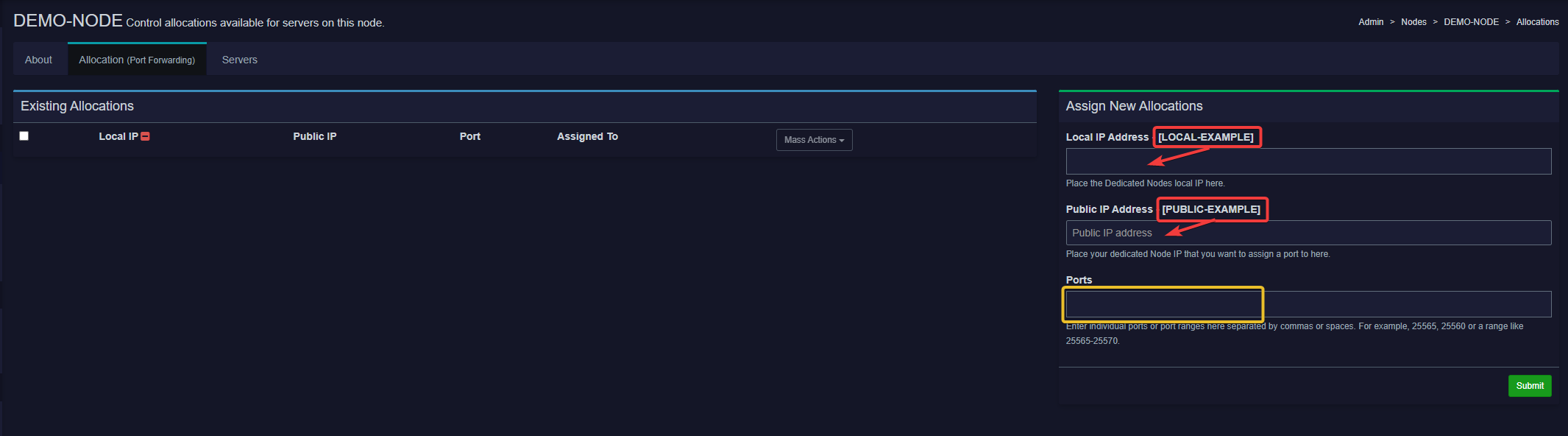
Note: You can assign more than one port at a time. If you need multiple consecutive ports, you can also use port ranges (e.g.,
25565-25570).
¶ 2️⃣ Creating a Server & Allocating Resources
-
Log in to your panel and navigate to the Administration area.
-
Click on
Servers List→Create New(top-right button). -
Begin filling out the basic server details:

- Server Name
- Choose a descriptive name (e.g.,
My Minecraft Server). - Allowed characters:
a-z,A-Z,0-9,_,-,., and space.
- Choose a descriptive name (e.g.,
- Server Owner
- Enter the email address of the user who will own this server.
- Server Description (Optional)
- Provide a brief explanation of what this server is for or any additional notes.
- Server Name
-
- Dedicated Node Management

- Select the dedicated node you will be creating this server on
- Select which ports will be assigned to this server.
Default Port&Additional Port(s)
- Dedicated Node Management
-
-
Application Feature Limits

Warning: Allocating a large number of backups can quickly consume the node’s hard drive space. If the node runs out of space, it may freeze or become unstable, requiring technician assistance (which could incur additional fees).
-
Database Limit
-
This sets how many separate databases (e.g., MySQL databases) the server owner can create for this server.
-
Increase the number if the server needs multiple databases.
-
Backup Limit
- The maximum number of backups a user can create and store for this server.
- Raising this limit lets users save multiple restore points.
-
Allocation Limit
- Defines the number of ports a user can allocate to the server.
- Increasing this number is essential for servers that require additional ports (e.g., multiple services running on the same server).
-
-
-
- Server Resources
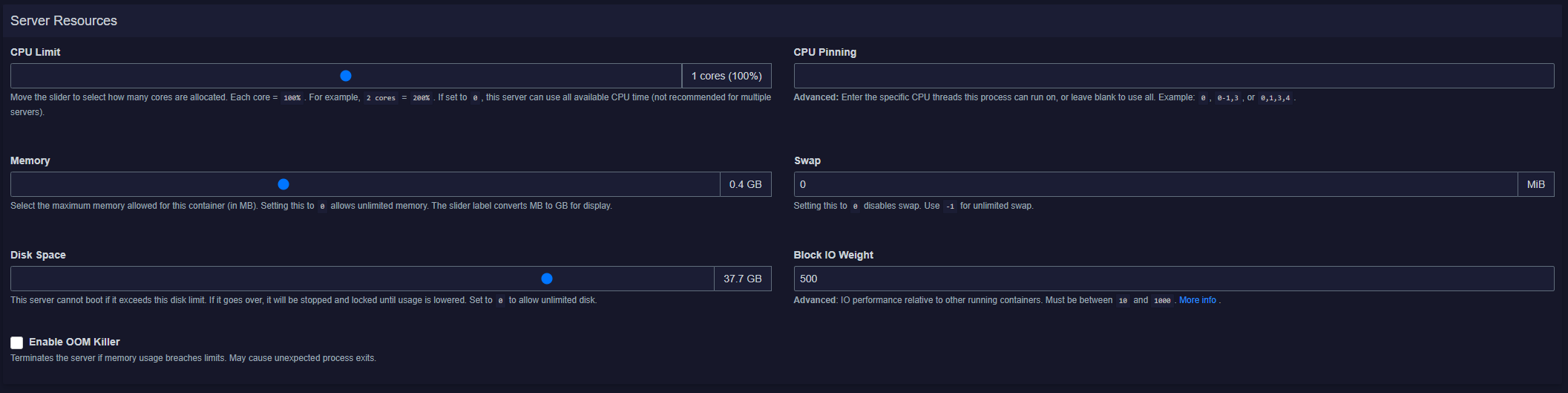
All resource values can be adjusted using sliders instead of typing manually. This helps prevent errors and makes allocation more user-friendly.
-
CPU Limit
- Slider: Determines how many CPU cores are available to the server.
1 core = 100%,2 cores = 200%, etc.
-
CPU Pinning (Advanced Users)
- Specify exact CPU threads (e.g.,
0, 1, 3) the server should use. - Leave blank to allow all CPU cores.
- Specify exact CPU threads (e.g.,
-
Memory (RAM)
- Slider: Adjusts the maximum amount of RAM available to the server.
- The slider converts MB to GB automatically.
-
Swap
- Provides additional “virtual” memory if RAM is fully used.
0disables swap.-1allows unlimited swap (use cautiously).
-
Disk Space
- Slider: Controls how much storage the server can access.
- If the server exceeds this limit, it will not boot and remains locked until usage is lowered.
-
Block IO Weight (Advanced Users)
- Adjusts the server’s priority for disk read/write operations.
- Range:
10to1000(default is500).
-
Enable OOM Killer
- Terminates the server process if it exceeds its memory limits, preventing the node from crashing entirely.
- Server Resources
-
-
Nest & Docker Configuration

Nests are categories (or “families”) of server types, such as “Minecraft Servers,” “Source Servers,” or “Voice Servers.”
Eggs are specific server configurations within those nests. For example, within the “Minecraft Servers” nest, you might find Vanilla Minecraft, Forge, or Spigot.-
Nest
1. Select the Nest that corresponds to the type of server you’re creating. (Example:Minecraft Servers) -
Egg
2. Pick the Egg that matches the specific version or mod of the server. (Example:Vanilla MinecraftorForge Minecraft) -
Skip Egg Install Script (Optional)
3. If your chosen Egg has an install script, it will run automatically on creation unless you check this box to skip it.
-
-
-
-
Docker Configuration
- Docker Image
- Here you choose the base image used to run your server.
- For Minecraft, various Java versions exist (e.g.,Java 21,Java 11,Java 8,Java 16).
- Docker Image
-
-
-
Startup Configuration & Service Variables
-
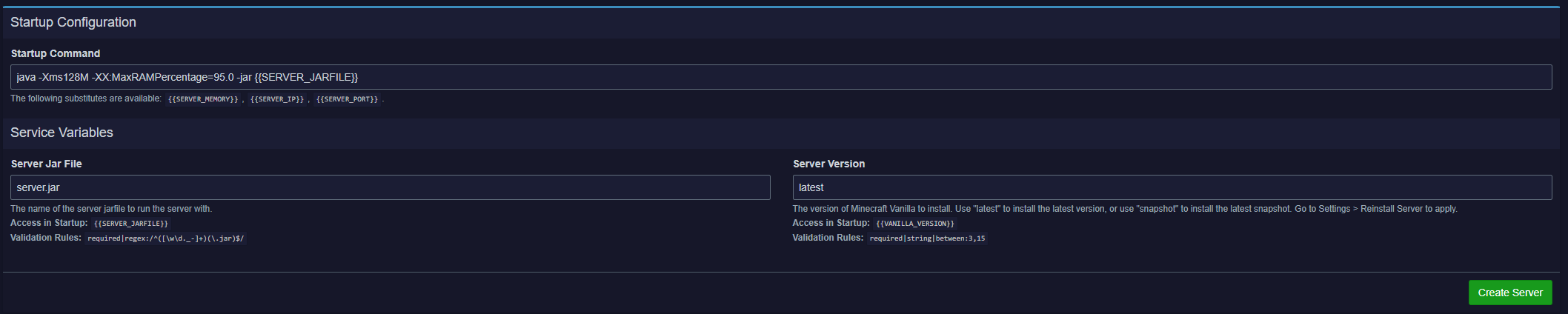
Startup Command
- This is the command your server uses to launch. In most cases, you can leave this at the default.
- Only change it if you know exactly how your server needs to start.
-
Service Variables
- These configuration fields vary depending on the type of server (egg) you selected.
- Examples (for Minecraft):
- Server Jar File:
server.jar - Server Version:
latest
- Server Jar File:
- Fill them out according to your server’s needs.
- If you’re unsure, use the default or check the documentation for your specific game/server version.
-
-
Once finished, click the green Create Server button at the bottom.
¶ 📁 How to upload large files/folders
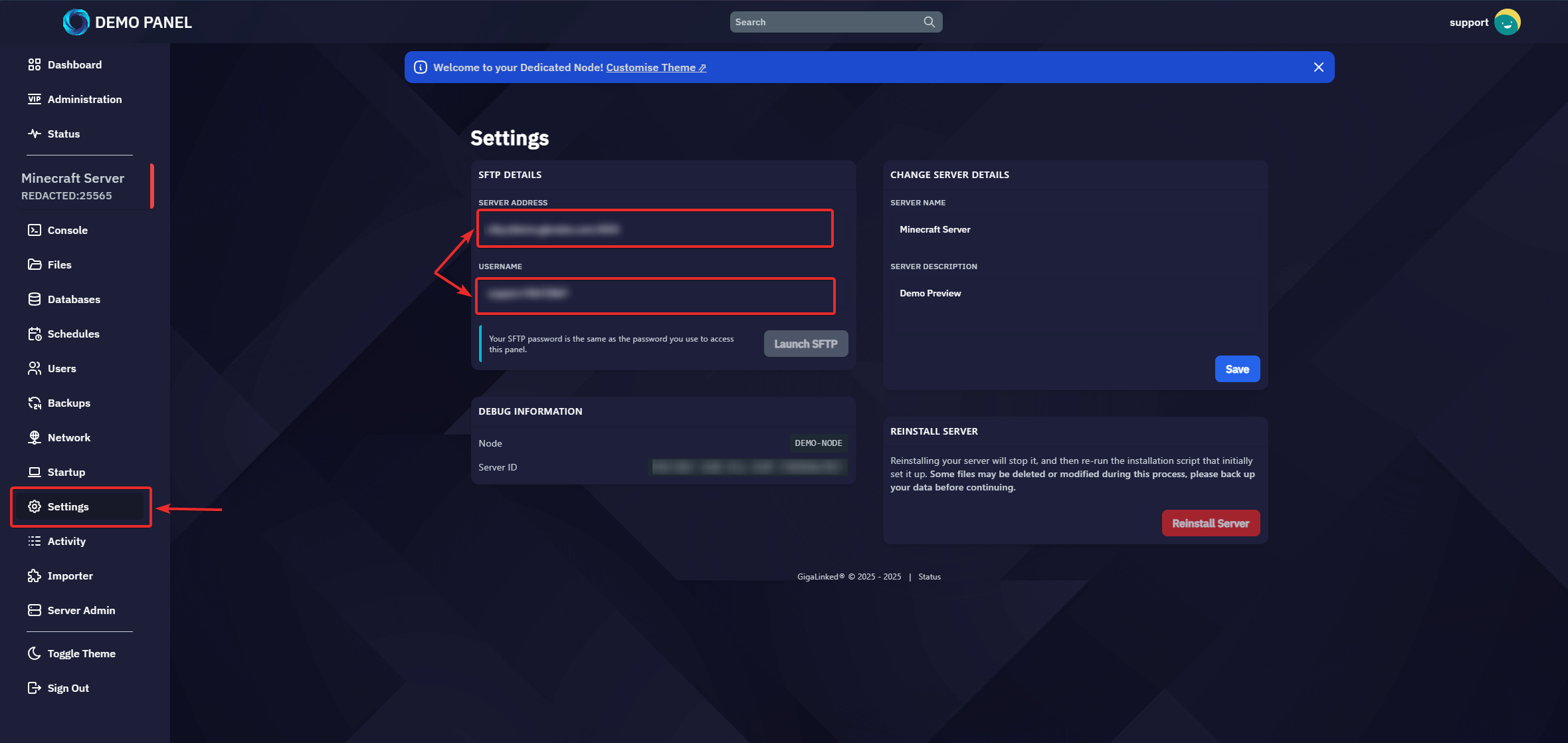
Important: Your SFTP credentials are unique to your panel user account and specific to each server. Never share these details with others.
¶ 1️⃣ Locate Your SFTP Details
- Log in to your GigaLinked Panel and select the server you want to access.
- In the left-hand sidebar, go to Settings → SFTP Details.
- Click on the address and username fields to copy them to your clipboard.
¶ 2️⃣ Choose an SFTP Client
GigaLinked recommends the following free SFTP programs:
- FileZilla
- Download Link: https://filezilla-project.org/
- WinSCP
- Download Link: https://winscp.net/
¶ 3️⃣ Connect to Your Server via SFTP
- Open your chosen SFTP client (FileZilla or WinSCP).
- Create a new connection (often in the “Site Manager” or “New Session” panel).
- Paste the host (address) and username you copied from your panel.
- Enter your panel account password when prompted.
- (Optional) If your panel uses a non-standard port for SFTP, make sure to update the port number accordingly.
- Click “Connect” or “Login.”
You can now upload, download, and manage your server files via SFTP.
¶ 👤 Creating Subusers
¶ Adding a Sub-User
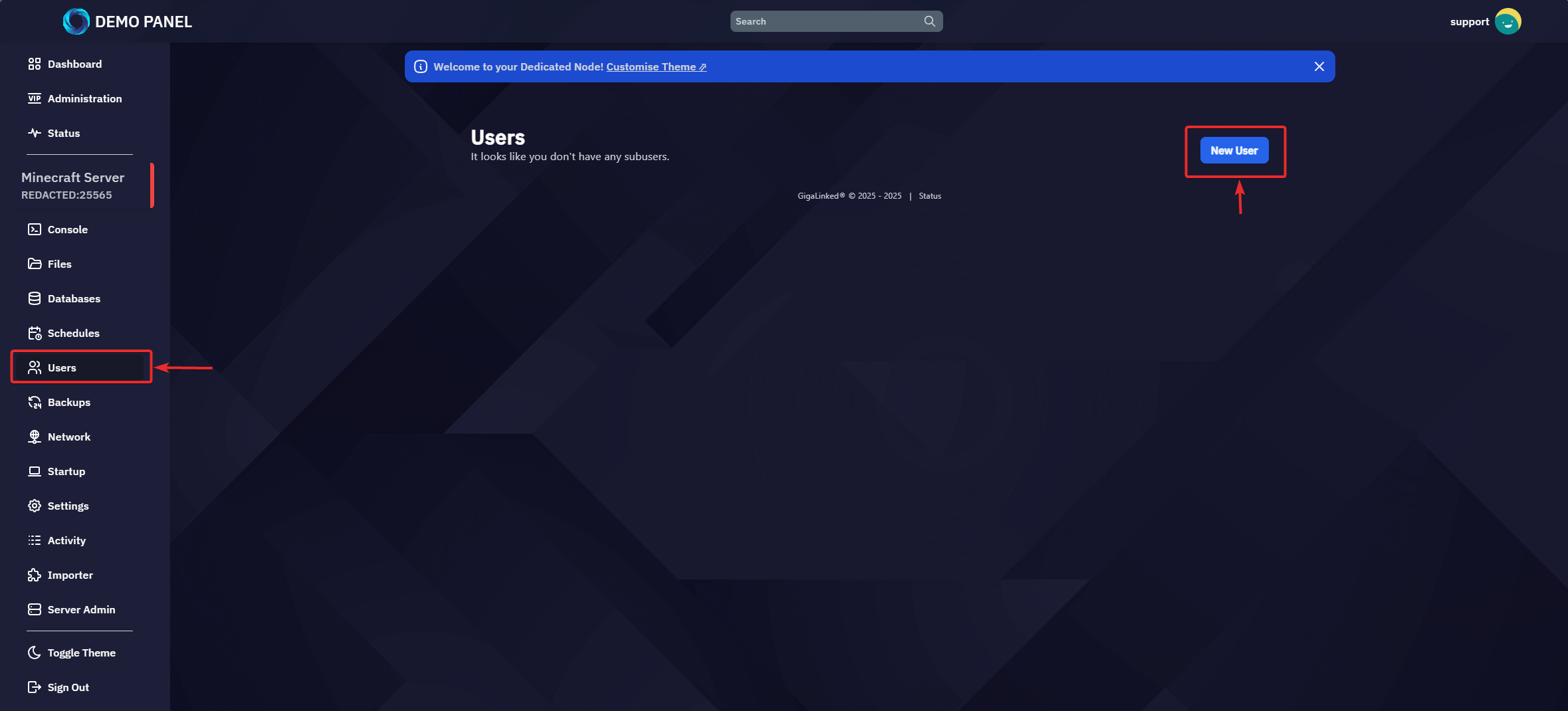
- Open the Server: Log in to your panel, navigate to Servers, and select the server you want to manage.
- Go to the Users Tab: Click on Users in the sidebar.
- Create a New Sub-User:
- Click the “New User” button.
- Enter the email address of the person you want to give access to.
- If this email is not already registered on the panel, a new account will be automatically created.
- Configure Permissions:
- The permissions are similar to Discord roles—simply check the boxes next to the permissions you want them to have (e.g., Console, Start, Stop, File Access, etc.).
Note: On many dedicated nodes, no email server is configured by default. This means the user will not receive an email prompting them to set their password.
To fix this, go to the Administration area and manually set a password for that new user after inviting them.
¶ Removing a Sub-User
- Open the Server: From the panel, select the server in question.
- Users Tab: Click on Users in the sidebar.
- Find the Sub-User: Locate the user you wish to remove.
- Remove/Trash Icon: Click the “Delete” or “Remove” button/icon next to their entry and confirm to remove their access.
That’s it! You’ve successfully added and removed sub-users on your server.
¶ 🛢️ How to Create Databases
Tip: Before creating a database, make sure your server’s Database Limit (in Application Feature Limits) is set to a value greater than
0.
¶ 1️⃣ Select the Server
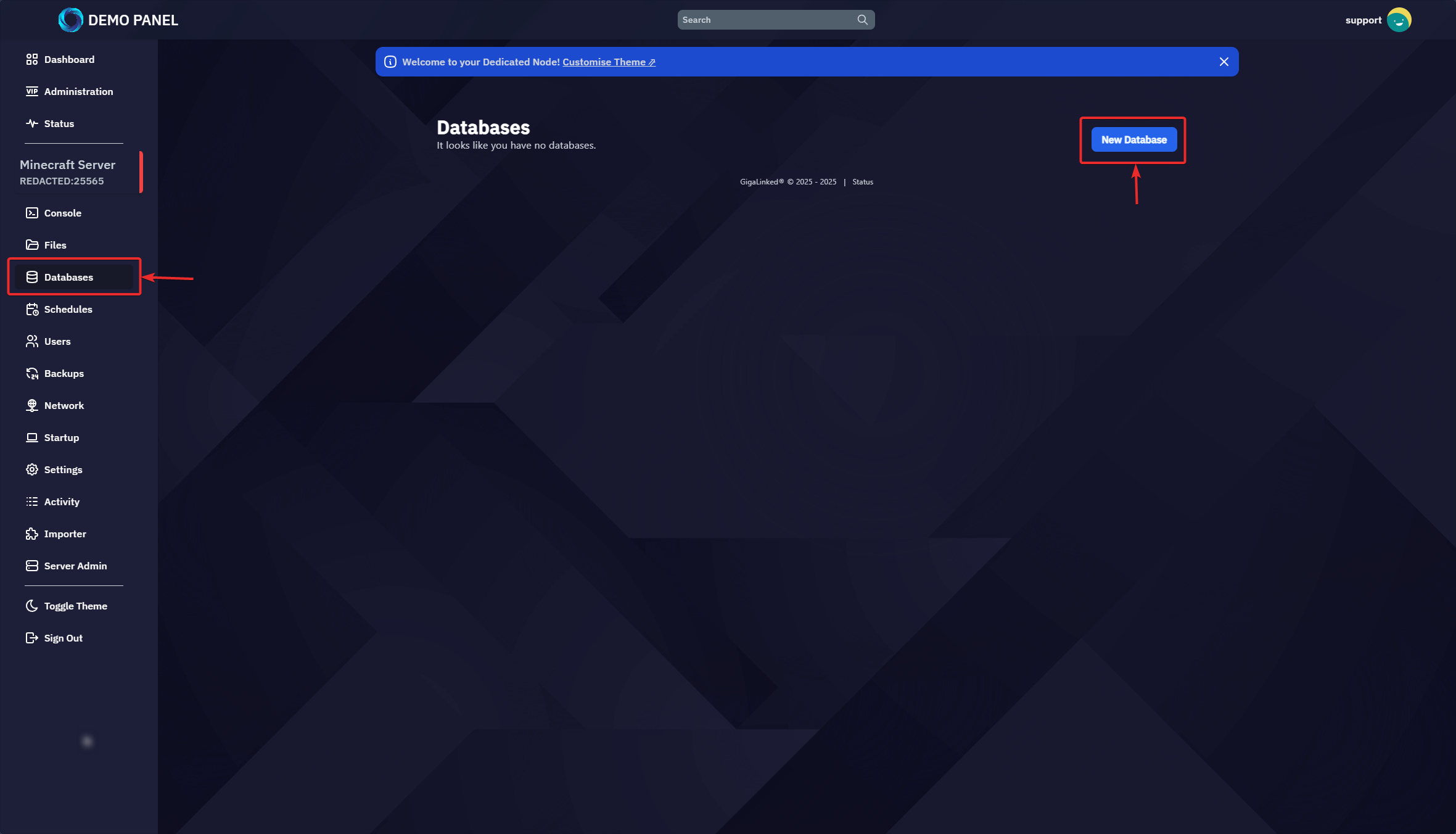
- In your panel, choose the server for which you want to create a database.
- Look for Databases in the left-hand sidebar and click on it.
- Click the “New Database” (blue) button.
¶ 2️⃣ Create a New Database
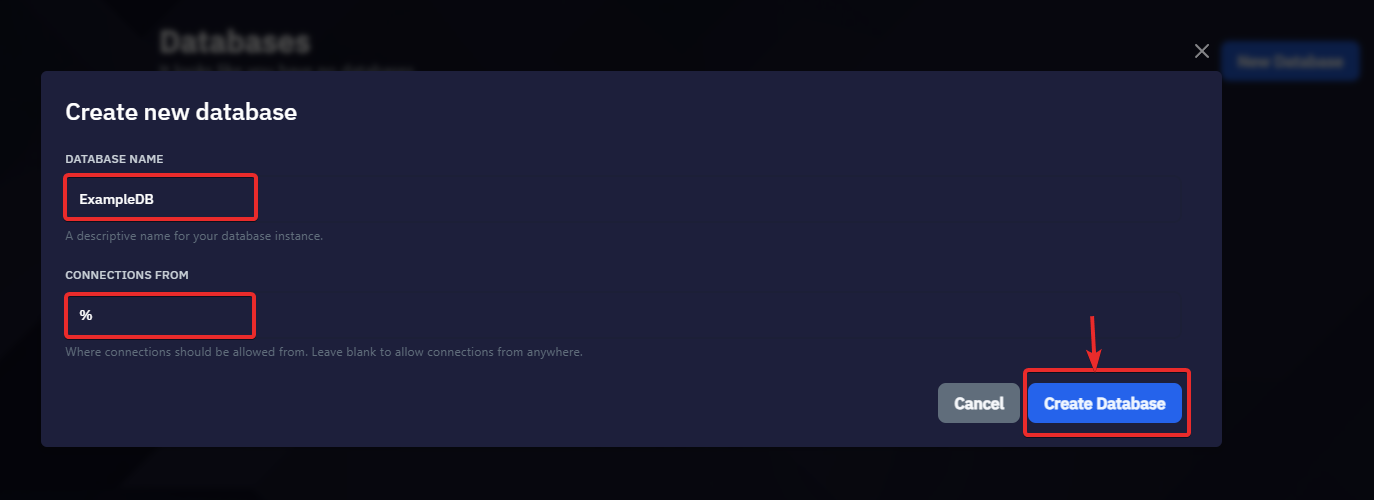
- Database Name: Enter a friendly name for your database (e.g.,
my_game_db). - Connections From:
- Leave this blank to allow connections from any IP.
- Optionally, specify a comma-separated list of IP addresses to whitelist (e.g.,
192.168.1.10, 192.168.1.11).
¶ 3️⃣ Database Credentials

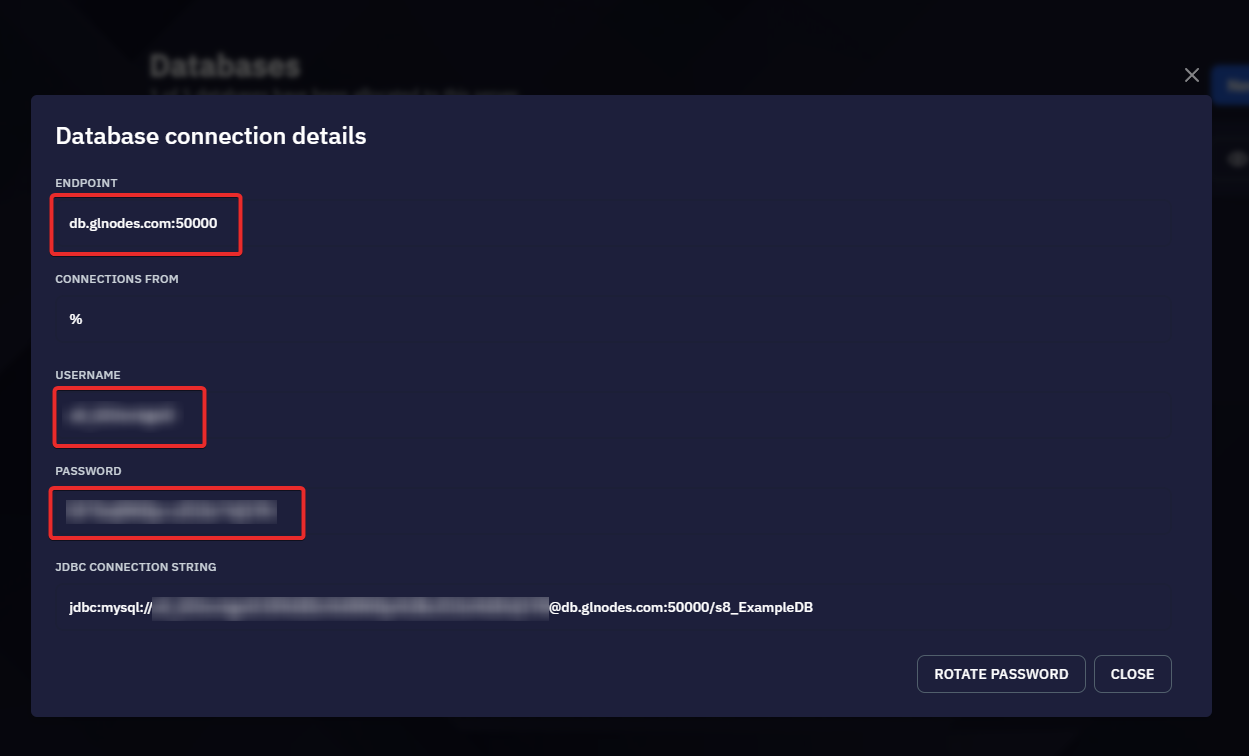
- After you create the database, you’ll see:
- Endpoint (default is
db.glnodes.com:50000) - Username
- Password
- JDBC Connection String (for advanced setups)
- Endpoint (default is
- Keep these details private—they’re unique to your database.
¶ 4️⃣ Accessing the Database
- External Software (e.g., HeidiSQL, MySQL Workbench, etc.):
- Use the endpoint, username, and password you were given.
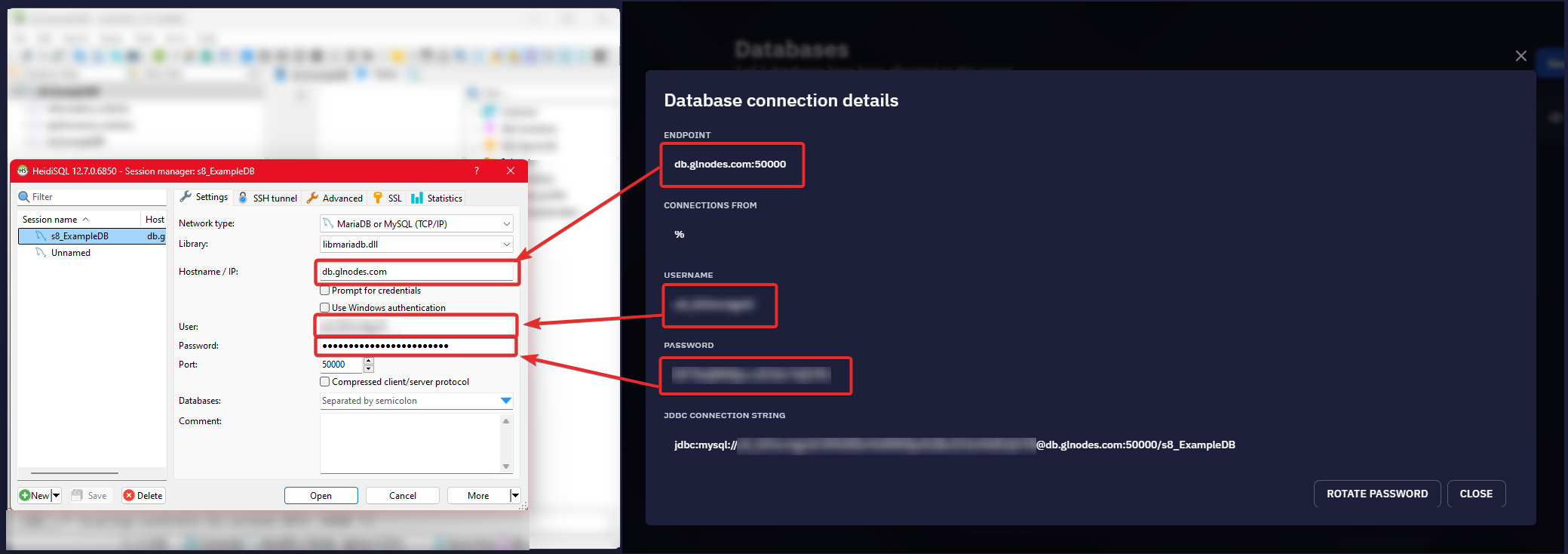
- Use the endpoint, username, and password you were given.
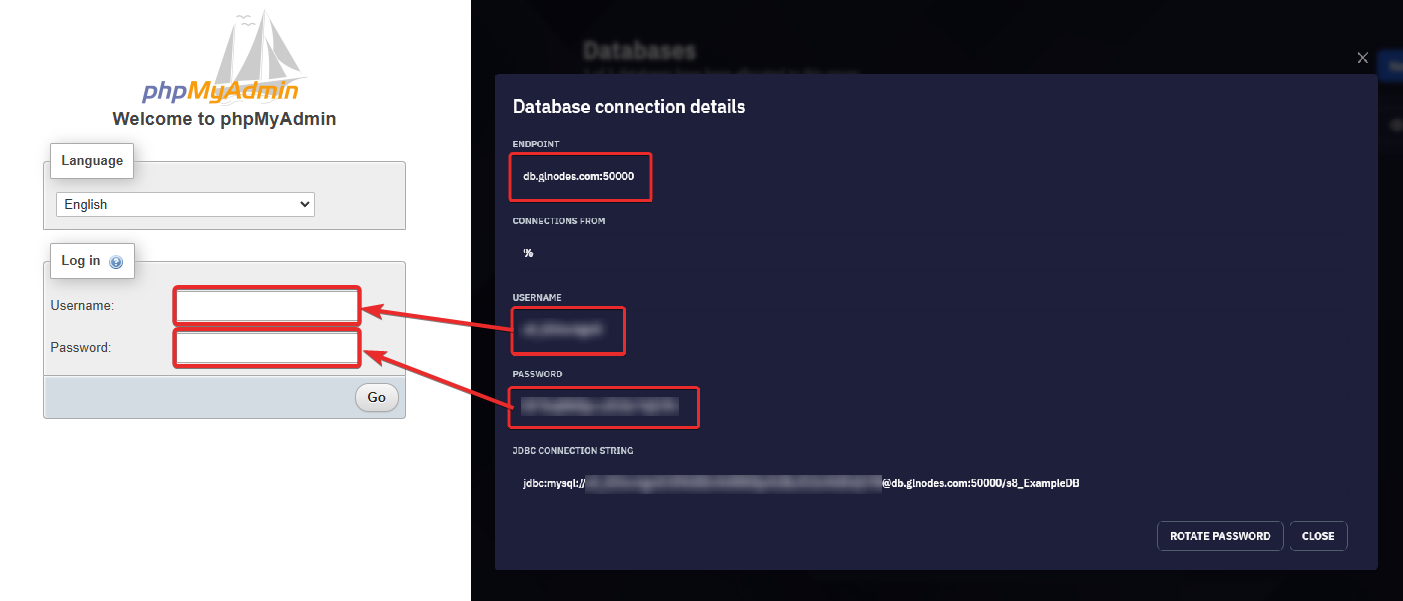
- phpMyAdmin:
- Open a new browser tab and visit: https://glnodes.com/phpmyadmin
- Log in with the username and password for your newly created database.
That’s it! Your database is now ready to store and manage your server’s data.
¶ ⬇️ Importing Servers
WIP
Coming Soon
¶ 🕒 Creating Schedules
WIP
Coming Soon
¶ 🎨 Customise Theme
WIP
Coming Soon